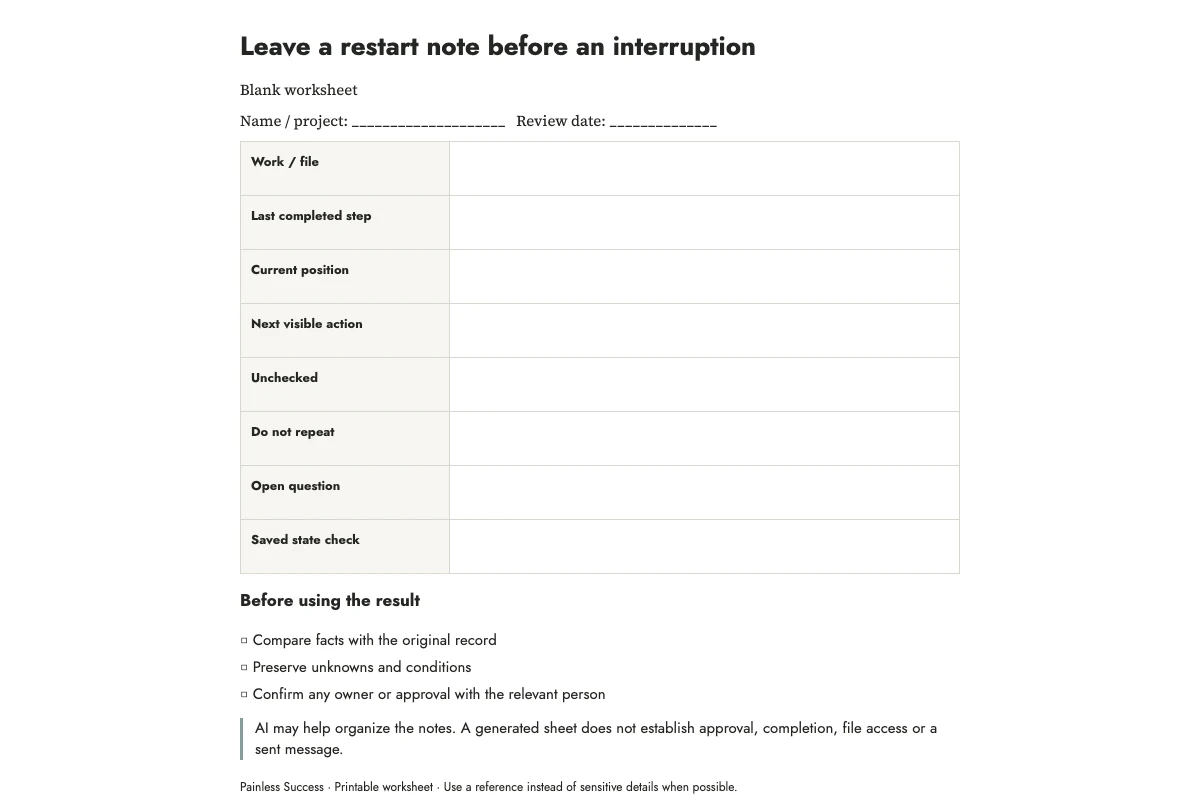
Before leaving an unfinished task, write down where you stopped and what to inspect first when you return. Name the file or object, the last completed step and the next action. Mark unchecked work clearly. Those details are enough for a restart note; the rest of the plan can stay where it is.
Consider this invented example: you are checking a community poster. The event date matches the source, but you stopped at the contact line and do not know which address is approved. The card says: poster-v4; date checked; stopped at contact line; find approved contact source before changing it; print margins unchecked. “Finish poster” would lose almost all of that useful information.
Write the note at the stopping point
Put the note where you will see it when you return: beside the paper, at the top of your working notes, or in the project record you already use. A separate app adds another place to remember to check. If others share the file, make it clear that this is your working note.
If you have only a moment, capture two things: your exact position and the next action. Add the rest when possible. Attend to urgent interruptions and shut equipment down safely before writing. This card is for ordinary desk work; follow the required shutdown procedure for any tool, machine, or specialist process.
I would write the first version directly. Asking AI to compose a note can take longer than making a four-line card. The AI prompt later in this article is useful when your rough notes contain several competing threads or you want to turn them into a consistent format.
To make a shorter card now, open the task restart tool and choose the interruption option. Record where you stopped, what to do next and when you will return. Print the result to leave beside your work, or download the notes before closing the page.
Describe a visible action
“Continue research” asks your future self to reconstruct the task. “Open the saved supplier comparison and check the delivery column against the two quotes” gives you a starting point. Name the document and the part of it that matters. Avoid relying entirely on a tab position that may change.
Choose an action you can take with the information you have. In the poster example, “find the approved contact source” comes before “replace the contact address.” If you cannot find the source, ask the appropriate person before making an edit from memory.
When a task has several possible next steps, choose the one that resolves the immediate uncertainty. You can list alternatives below it, but make the top line unambiguous enough to begin.
Mark completed and unchecked work separately
A partially checked document is easy to misread later. Write which checks you actually performed and which remain. “Reviewed” is too broad if you checked dates but not names, calculations, or formatting.
Use ordinary status words: checked, unchecked, blocked, or changed since checking. If someone edits the date after your review, the old check no longer establishes that the new date is correct. Leave enough context to know what version you inspected.
For paper work, place a removable marker beside the stopping point if that helps you find it again. Use something clearly different from an approval mark so the next person can tell what it means.
Use a bounded prompt when the notes are messy
Paste only the relevant notes, removing confidential material you do not need for the formatting task. OpenAI's prompting guidance recommends specific context and instructions. The prompt here asks for a card and explicitly prevents the response from claiming that files were opened or saved.
Format these invented notes as a restart card. Fields: work/file, last completed step, current position, next visible action, unchecked work, open question, saved-state check. Use only these facts. Do not claim to open or save the file. Do not infer that an unchecked item passed. Draft text only.
N1: Working on community poster draft poster-v4.
N2: Event date has been checked against the source note.
N3: Stopped at the contact line below the date.
N4: Need to compare the contact line with the approved source. Which address is approved is still unknown.
N5: Print margins have not been checked.
N6: Before leaving, I need to save and reopen the exact draft to confirm the current state.
Give one first action on return that does not assume the missing approval.
The expected first action is to locate the approved contact source, not to choose an address. “Saved-state check” must remain a check for you to perform. A generated card cannot confirm the state of a local document merely because its name appears in your notes.
Confirm the saved state yourself
Save your work through its normal process. If version confusion is likely, reopen the exact document you intend to continue and confirm that the latest change is present. Note a version identifier or location that you can actually use. Do not invent a complicated naming scheme just for this card.
For work that cannot be saved as a document, describe the physical state: which stack has been sorted, which page needs checking, or which materials belong together. Avoid putting private information on an exposed desk card when a neutral reference will do.
On return, check before acting
Read the note, open the named work, and confirm that the situation still matches it. A collaborator may have changed the file or answered the open question while you were away. If the state changed, update the first action instead of following the old instruction mechanically.
Perform one visible step, then return to the normal task. You do not need to maintain a permanent archive of every interruption card. Keep one only when it contains a decision, unresolved question, or useful record that belongs in the project's existing notes.
If the interruption itself needs a boundary, use the return-time guide. If the gap lasted weeks and the project's assumptions may have changed, use the long-break restart guide. This small card works best when the task is still familiar and you mainly need to recover your place.
Print and practice
Blank worksheet · Filled practice example · Complete prompt. Print in portrait on A4 or US Letter, or use your browser's Save as PDF option. The example is fictional; leave confirmation and review fields blank until you perform those checks.
More practical tools
Unstick a task or compare two options. Fill in your own details, then print the result or download your notes.