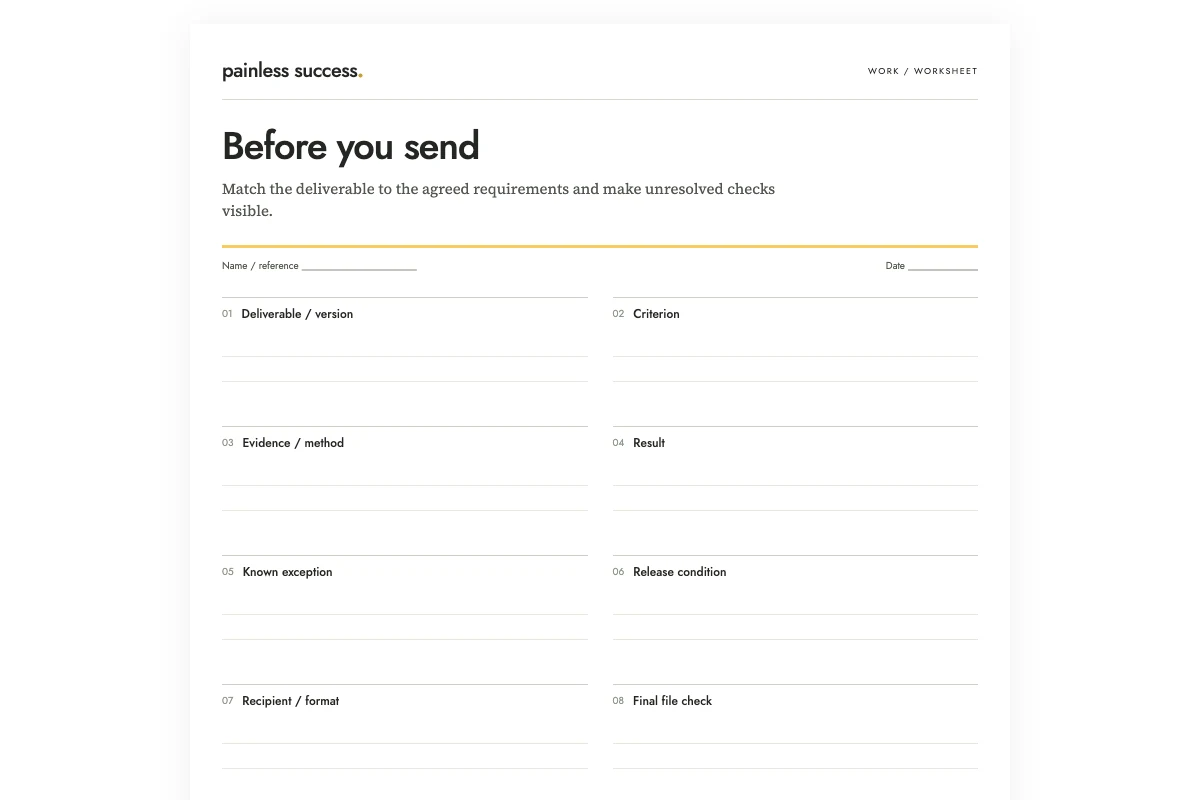
Before sending a file, compare it with the agreed requirements. Name the exact version on your acceptance checklist and write down how you will check each requirement. Keep failed checks and unresolved conditions visible. This review can establish whether the file is ready to send; the recipient's acceptance is a separate matter.
Here is an invented example. A workshop participant sheet must contain three start times, a room number, and the facilitator contact address. The PDF looks finished, but the room is unconfirmed. The review row says: room number required; confirmation pending; do not send until confirmed or the omission is explicitly accepted. A polished page does not resolve the missing information.
Start from the brief, not from what the file happens to contain
Read the agreed request before opening the finished work. Build the checklist from that request so it includes requirements that may be missing from the file. Looking only at the finished page makes those omissions easy to miss.
Use the brief, accepted changes, or relevant approval record as the source. For a small personal project, this may be a few written notes. For shared work, use the established source rather than creating a competing set of requirements in a private worksheet.
Put suggested improvements in a separate list. An unagreed decorative cover should not hold up a file that meets the requirements. The required contact address still needs space, however, even if the current layout is full.
Turn each requirement into an observable check
“Looks professional” is difficult to verify consistently. “All three start times match schedule revision 2” tells the reviewer what to compare. “Easy to use” may need clarification about the intended audience and task before it can become a useful check.
Include the evidence location and the method. The workshop times require comparison with the approved schedule; the contact address requires the approved contact list. If those sources are not available, mark the checks blocked. Do not substitute an old email or a remembered detail without recording that you still need confirmation.
I would keep each row narrow enough to have one clear result. A row called “content, layout, access and accuracy” is too broad: a pass could hide three unchecked areas. Separate checks when a failure would require a different correction.
Use results that describe what happened
Useful statuses are not yet checked, passed, failed, and blocked. Add not applicable only with a reason. A blank box can be ambiguous, so the printable example uses explicit wording in the result field.
Write evidence after you perform the check. “Compared all three times with schedule revision 2” records a specific action. “Should be correct” records an expectation. If you discover a mismatch, note the correction and repeat the affected check on the corrected file.
Record the reviewer's name and date after the review happens. If you need to suggest a reviewer in advance, label that person as proposed so their name cannot be mistaken for an approval.
Ask AI to draft the checklist from the supplied requirements
The prompt can help turn a short brief into rows without pretending to inspect the deliverable. OpenAI's guidance supports giving the model a specific task and reviewing its response. The acceptance method here is an editorial template, not a guarantee of error-free delivery.
Draft a pre-send acceptance checklist from this fictional brief. Return criterion, how a person can check it, evidence location, result, and unresolved exception. Leave every result as not yet checked. Separate agreed requirements from suggested improvements. Do not claim to open files, test links, confirm access, approve exceptions, or send anything.
B1: Deliverable: workshop participant sheet v3 as a PDF.
B2: The PDF must show the three session start times from approved schedule revision 2. The schedule itself is not provided.
B3: It must include the confirmed room number. The room number is still pending.
B4: It must contain the facilitator contact address from the approved contact list, which is not provided.
B5: The agreed audience is workshop participants. Sending is a separate human action.
B6: Someone suggested adding a decorative cover; this was not accepted into scope.
Flag any release condition that cannot currently be met. Do not turn B6 into a requirement.
The expected checklist leaves every result unchecked. It should flag the room as a release problem and the missing source documents as checks that require your attention. If it reports that the start times are accurate, it has claimed evidence it does not have. If it adds the decorative cover as mandatory, it has changed the scope.
Inspect the file that will actually leave your hands
After correcting the source document, open the exported file or shared version you intend to send. Check its contents and filename against the version you reviewed. A thumbnail or the word “final” cannot tell you whether the attachment contains your latest corrections.
Check links and access through the appropriate process for the recipient and the material. Do not make a private document publicly accessible merely to simplify delivery. When access cannot be verified from your position, record the limitation and follow the usual sharing procedure.
For a printable deliverable, inspect the intended paper layout or a suitable proof. A page that looks fine in the editor may need a separate output check. Record what you tested without claiming that every printer or device will behave identically.
Handle exceptions explicitly
Sometimes the responsible person accepts a known omission or changes the requirement. Record that decision and its source; then review the file against the revised requirement. Do not relabel a failed check as passed just because the deadline is close.
For the missing room number, you could wait for confirmation, postpone delivery, or seek approval for a version that explains where the room will be announced. Keep the issue open on the checklist until the responsible person has chosen an authorized option.
If the requested correction introduces additional work beyond the agreement, use the scope-check guide before treating it as an automatic commitment. If the finish line was never clear, use the project finish-line guide to define it.
Keep sending as a separate recorded action
Once the required checks are complete and exceptions are resolved, identify the intended recipient and channel. Then carry out the actual send or share through your normal process. Record it afterward if the project needs delivery evidence. A checked worksheet is not proof that a message was sent.
The guide to putting finished work into use covers the next step beyond production. Keep this acceptance sheet with the exact reviewed version when traceability matters, and avoid carrying old pass marks forward onto a file that has changed.
Printable materials
Blank worksheet · Filled fictional example · Complete AI prompt. Use portrait printing on A4 or US Letter, or save a PDF from your browser. The filled sheet demonstrates the fields; it does not document a completed real review.
More practical tools
Unstick a task or compare two options. Fill in your own details, then print the result or download your notes.