
In this invented example, Sam has 32 available work hours next week. Meetings take six hours, routine work takes five, and Sam keeps three hours unassigned for expected interruptions. That leaves 18 hours for planned project work: 32 − 6 − 5 − 3 = 18.
Sam has three proposed tasks: a report needing six to eight hours, a presentation needing four to six, and a file cleanup needing three to five. Together they need 13 to 19 hours. At the low estimate, they fit. At the high estimate, they need more time than Sam has. Before promising all three, Sam needs to agree a smaller cleanup, move it to another week, or change another commitment.
Use the existing calculator with the paper sheet beside it. Use the calculator for the subtraction and the sheet to keep track of what went into it: the commitments, the uncertain estimates and the work you chose to leave out. Then check the deadline against the calendar, even if the calculation shows spare hours.
Print the blank capacity sheet · See the filled example · Download the full AI prompt. Use A4 or US Letter in portrait, or your browser’s Save as PDF.
1. Define what “available hours” includes
Write the dates at the top of the sheet and decide where your working day begins and ends. Count the hours you expect to have this week, allowing for leave and appointments before entering the total.
Keep lunch consistent. If your total already excludes lunch, do not subtract it again under breaks. If lunch falls inside the total, include it once. Apply the same rule to an appointment: subtract it from availability or count it among commitments, never both.
For example, four eight-hour days give 32 hours within those stated boundaries. A further two-hour absence would reduce that to 30. Do not start with a usual five-day total simply because it is easier to remember. Write “four available days” alongside the number so you can reconstruct it later.
2. Give each commitment one home
Use four lines: available hours, meetings, routine work and breaks, and reserve. Count meeting preparation and follow-up either with meetings or routine work. Add a short note explaining your choice. Check that every commitment appears exactly once, whichever category you choose.
A recurring report might be routine work in one role and project work in another. Choose the category that matches this planning exercise. If the report is already in the five-hour routine allowance, do not also include it among proposed projects. Counting it twice could make you turn down work that would fit.
For work that varies from week to week, start with a recent comparable week and label the figure as an estimate. If that week included a special event, note the difference before borrowing its total. It may need adjusting.
3. Explain the reserve
Sam chose a three-hour reserve for this example; your week may need a different allowance. On your sheet, name what the reserve covers: unscheduled requests, late corrections or a task whose inputs have not arrived. If you cannot explain the number, keep it provisional and review what actually happened.
Assigning the reserve to a fourth project uses up the time set aside for uncertainty. If priorities require that change, record it on the sheet, including which risk is now uncovered and who needs to know.
A negative calculation means the commitments you entered exceed the hours you entered. First check for duplicates and unit errors. If the figures are right, change the plan. Keep the negative result visible so you can see how much work needs to move.
4. Compare a range of effort with the remaining hours
List each proposed task with a low and high estimate, a clear deliverable and any dependency. Use hours throughout. Ninety minutes is 1.5 hours, not 0.90. Include the work needed for a usable delivery: preparation, drafting, checking and revisions where those belong to the task.
Sam's proposed work totals 13 to 19 hours. The high estimate exceeds the 18-hour capacity by one hour. Promising all the work would depend on the estimates coming out favourably. Sam could limit the cleanup to its first three-hour stage, leaving the rest for a later review. The revised upper total becomes 17 hours.
Waiting time belongs in a separate dependency note. A two-day approval wait may require little active work while still preventing Friday's delivery. Keep those 48 elapsed hours separate from the working estimate, but allow for the wait when checking the delivery date.
5. Check whether the hours exist in usable blocks
Look at the actual calendar after doing the subtraction. A presentation needing a two-hour rehearsal cannot use four isolated half-hours in the same way. Mark the windows that match the work, including preparation and any required person or equipment.
If Sam's remaining hours are scattered, the next decision may be to move a meeting or split a deliverable at a useful stopping point. Counting the same open hour against two tasks does not solve the problem. Pencil each planned block into the week once, then look for work that still has no place.
Leave the chosen reserve visibly unassigned. A rough outline of the week is enough to check for uninterrupted space; you do not need to schedule every minute.
6. Ask AI to check the arithmetic and missing information
You can complete this worksheet without AI. If a second pass is useful, share only a simplified list that you are allowed to disclose. Replace project and client names with neutral labels. Ask AI to organize the figures you supply and point out gaps. Keep calendar access and commitments outside this task.
Check this invented weekly capacity plan using only the supplied notes.
Return: arithmetic, task-total range, possible double-counting questions,
dependencies, and two possible changes for a human to consider.
Do not claim calendar access. Do not assign people, invent estimates,
move appointments, send messages or accept work. Mark missing facts unknown.

Available: 32 hours across four days; lunch is already excluded.
Meetings including preparation and follow-up: 6 hours.
Routine work: 5 hours; excludes the proposed tasks below.
Reserve for interruptions: 3 hours, not assigned to another task.
Report: 6–8 hours; input file expected but arrival date unknown.
Presentation: 4–6 hours; requires one uninterrupted two-hour window.
File cleanup: 3–5 hours; can be split after the first three hours.
Calendar windows have not been supplied.

Show every sum. Keep active work separate from elapsed waiting time.
Finish with what I must verify before promising the work.
The expected arithmetic is 18 hours remaining and 13-19 hours of proposed work. Check it yourself. A response claiming that the presentation fits on Tuesday has invented calendar information. A response promising the report by Friday has ignored the unknown input date.
7. Turn the conflict into a specific choice
When another person controls priorities, explain what can change alongside the hours available: “The three items need up to 19 hours against 18 available. I can limit the cleanup to three hours, or move it. The report also depends on an input date we have not confirmed. Which delivery should take priority?”
Record the agreed change and the person who accepted it. Until agreement exists, label it proposed. Leave the decision open on the sheet until someone has agreed to it.
At the end of the week, compare one important estimate with the work it actually required. Note the reason for the difference: missing input, extra revision, interruption or a poor initial estimate. Use that note when planning a comparable week. A brief note is enough to help you avoid counting the same work incorrectly next time.
For the next step, use estimates from a previous attempt and planning revision time. If dependencies dominate the schedule, read planning work while waiting on someone else.
More practical tools
Unstick a task or compare two options. Fill in your own details, then print the result or download your notes.
Check capacity before the deadline, not only across the week
A positive weekly balance does not establish that a Thursday delivery fits. Use this additional invented example after the calculation above. Sam has 18 project hours left for the week, but only 10 of those hours fall before Thursday at noon. The other eight hours arrive after that deadline.
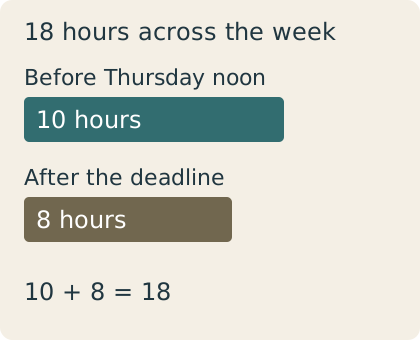
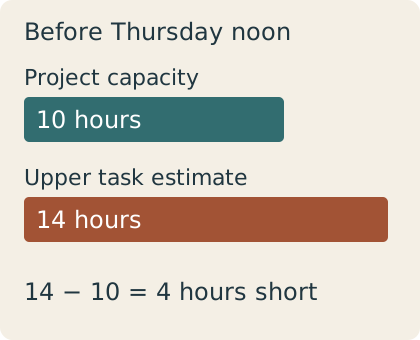
Suppose the report and presentation are both due Thursday at noon. Their combined estimate is 10–14 hours: 6–8 for the report plus 4–6 for the presentation. At the low estimates they fill the whole ten-hour window. At the high estimates they exceed it by four hours. The weekly calculation still shows spare time, but that time cannot repair this earlier shortfall.
| Check | Calculation | Meaning |
|---|---|---|
| Full-week project capacity | 32 − 6 − 5 − 3 = 18 hours | Unchanged from the main example |
| Before-deadline project capacity | 10 hours | A supplied calendar total, after commitments and reserve |
| Report plus presentation | 6 + 4 to 8 + 6 = 10–14 hours | Fits only at the lowest combined estimate |
| Shortfall at upper estimate | 14 − 10 = 4 hours | Work or timing needs an agreed change |
I would raise the four-hour conflict before accepting both deliveries. Moving the file cleanup does not help this deadline if it was already scheduled afterward. If the two owners agree to move the presentation, recalculate the report on its own: 6–8 hours against 10 leaves 2–4 hours. That arithmetic still depends on the report input arriving in time.
- Write the exact deadline, including the time of day.
- Count usable project hours before it. Exclude commitments and the reserve once; do not subtract them twice from an already net figure.
- Add the low and high estimates for work due in that window.
- Check dependencies and any uninterrupted block the work requires.
- Record a proposed scope or deadline change. Mark it agreed only after the relevant person accepts it.
Use this bounded prompt with the paper sheet. It supplies the calendar totals explicitly; the assistant does not need account access.
Check this invented plan using only these figures:
Full-week project capacity: 18 hours after commitments and reserve.
Project capacity before Thursday noon: 10 hours; the remaining 8 fall afterward.
Report due Thursday noon: 6–8 hours. Input arrival time is unknown.
Presentation due Thursday noon: 4–6 hours; needs one uninterrupted 2-hour block.
File cleanup: 3–5 hours, planned after Thursday noon.
Show the before-deadline demand range and upper-estimate shortfall.
Explain whether postponing the cleanup solves that shortfall.
Then calculate the report-only case if the presentation deadline is moved.
Keep all changes proposed. Do not claim calendar access, invent an input date,
move appointments, send messages or mark work complete.
Expected check: demand 10–14 hours, upper shortfall four hours, no extra before-deadline capacity from moving the cleanup. The report-only case leaves 2–4 hours. The input arrival and the presentation's uninterrupted block remain unknown. If the answer says that all work fits because 14 is less than 18, it has used the wrong time window.
Print the A4 deadline sheet or print the US Letter sheet. Each includes this filled example and a blank table; use your browser's Save as PDF to keep a copy.