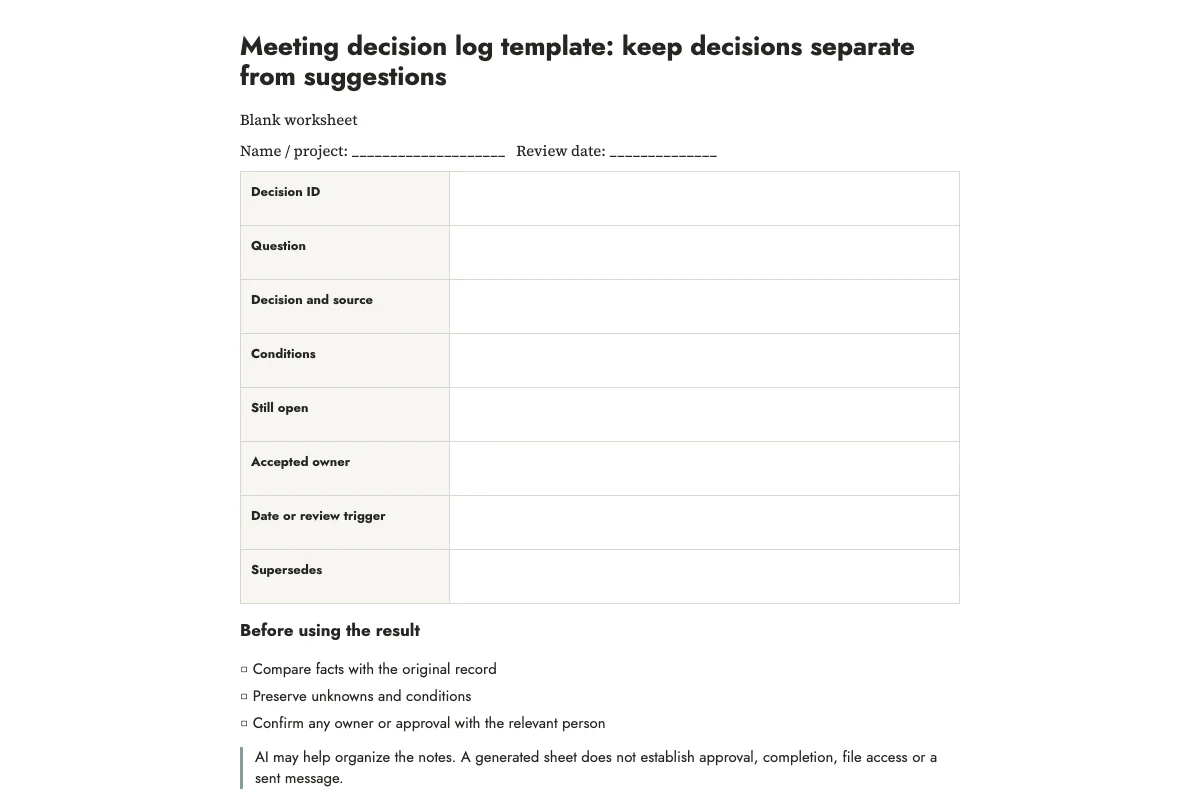
A meeting decision log records what a group agreed to do, including any conditions. Give each decision an identifier and a reference to the notes that support it. Record actions and unresolved questions alongside the choice so a later reader can tell what was agreed and what still needs attention.
Here is an invented example. A group chooses poster layout B for one proof. Display permission is pending, so the decision does not authorize a full print run. Mira accepts the proof task, with no agreed completion date. The log says: D-01: use layout B for one proof; no full batch before display permission is confirmed. That sentence is more useful than “poster approved,” which silently removes the limit.
Start with the choice, not the entire conversation
A decision log is easiest to maintain when it records one choice per entry. “Poster project” is a subject; “use layout B for one proof” is a decision. Several choices discussed in one meeting can have separate entries. A discussion that ends without a choice belongs in the open-questions field.
I would keep the full meeting notes and use the log to find the relevant passages. Include a reason when it helps explain the choice, such as selecting a layout because it fits the available board. You can leave the rest of the discussion in the notes. Where no reason was recorded, write that it is unknown.
The blank sheet and filled example are linked at the end of this article. Use them beside your meeting notes to check that each field contains the information someone will need later.
Capture eight fields while the wording is fresh
Write the question, the chosen option, the conditions, the unresolved questions, the accepted action owner, the timing, the source reference, and whether this entry replaces an earlier decision. For a small personal project, a date and notebook page may be enough as a source. A shared project may need the existing meeting record or approved document location.
A condition changes what someone may do next. “Use B if the printed text remains readable” is different from “use B.” Copy conditions carefully, even when they make the entry longer. Keep the decision date separate from an action deadline. The day a meeting took place does not tell you when someone promised to finish.
If you cannot tell whether a proposal was accepted, mark it “confirmation needed.” Do not ask AI to settle the disagreement from tone, silence, or your guess about what a participant probably intended.
Use AI to sort the notes
The complete downloadable prompt uses numbered source notes. Its job is to sort statements into the fields, preserving unknowns and conditional language. OpenAI's prompting guidance recommends clear instructions and reviewing the response. Here, a fixed structure gives you specific things to inspect.
Before pasting real notes, remove unrelated personal details and check that the tool is suitable for the information you intend to share. The example uses a fictional community poster, so you can practice without sharing an actual meeting record.
Create a draft decision log from the practice notes below. Use only supplied facts. Return decision ID, question, exact decision, conditions, unresolved questions, accepted owner, timing, and source IDs. Distinguish decided, proposed, and unknown. Do not infer unanimous agreement or invent deadlines. Draft only: do not update shared records or send messages. Flag contradictions instead of resolving them yourself.
N1: The group discussed two noticeboard poster layouts, A and B.
N2: The group agreed to use B for one printed proof.
N3: Permission to display the poster is still pending. No full batch may be printed before permission is confirmed.
N4: Mira accepted the task of preparing one proof. No completion date was agreed.
N5: Review when the proof and permission are available.
N6: Sam suggested making postcards too; no decision was taken.
Finish with checks the human note-taker must perform before treating the log as agreed.
Check the log before treating it as agreed
Read each entry against its source. In the practice example, N2 supports one proof; N3 supplies the print restriction; N4 supplies an accepted owner but no date. N6 is a suggestion about postcards and must remain outside the decision column. A model that writes “prepare posters and postcards” has merged a choice with an unaccepted idea.
Ask the relevant people to confirm the wording through your normal process. Keep the entry marked as a draft until they do, then record the confirmation reference. Filling in a template does not give the note-taker approval authority, and a generated summary cannot establish participants' agreement.
For a quick verbal discussion, the check may be a short read-back: “We chose one proof of B, with the batch still blocked by permission. Is that accurate?” For a formal decision, use the organization's actual approval process rather than replacing it with a checkbox.
Update the record without erasing the change
Suppose the proof shows that layout B is difficult to read. The group later chooses A. Give the new choice its own identifier and mark D-01 as superseded by it. Keep the earlier entry available with its date and conditions. This lets a future reader distinguish a changed decision from a transcription mistake.
A correction is different. If the original notes say B and the log accidentally says A, correct the error and leave a brief correction note. Do not manufacture a new group decision to explain a typing mistake.
Keep the sheet useful after the meeting
Review open conditions when the relevant evidence arrives. In the poster example, completing the proof leaves display permission pending. Update each condition only when you have evidence that its status changed; otherwise leave it open.
Use the agenda worksheet before the next discussion, the action-owner guide when work needs assigning, and the agreement summary guide when you need a short message that reflects a confirmed outcome. The decision log remains the place to find the choice, its limits, and the record that supports it.
Print and practice
Blank worksheet · Filled practice example · Complete prompt. Print in portrait on A4 or US Letter, or use your browser's Save as PDF option. The example is fictional; leave confirmation and review fields blank until you perform those checks.
More practical tools
Unstick a task or compare two options. Fill in your own details, then print the result or download your notes.